Welcome to the
RSPH Financial Approval System (R-FAS)
R-FAS is used to request authorized approval to expend RSPH funds. This system replaces the need for email approvals. This system does not replace the need to submit a Compass or Emory Express request.
HINTS & TIPS
Service Type: Finance Approval Request
Attachments:
· Make your attachment(s) meaningful. Provide enough detail for your reviewer to make an informed decision.
o Attach a copy of your draft Compass or Emory Express summary sheet.
o No summary sheet? Attach a copy of the invoice or receipt.
o Upload a spreadsheet if necessary (see multiple types of requests below).
· More than three attachments? Upload a ZIP file.
IT-related Item
Check the IT Related Information box
· if you made an IT-related purchase without IT’s prior approval.
Do not check the box
· if you have previously received IT approval to make the purchase.
Speedtypes and (PI/Alternate Approver) Information
· Non-RSPH speedtypes are not contained within the R-FAS system. E-mail approvals can be used for non-RSPH speedtypes.
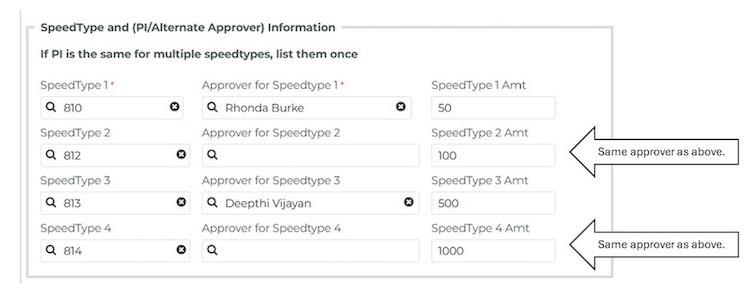
· If the PI is the same for multiple speedtypes, you only need to list the PI’s name once.
EXAMPLE
Multiple lines or types of requests
Save time and effort.
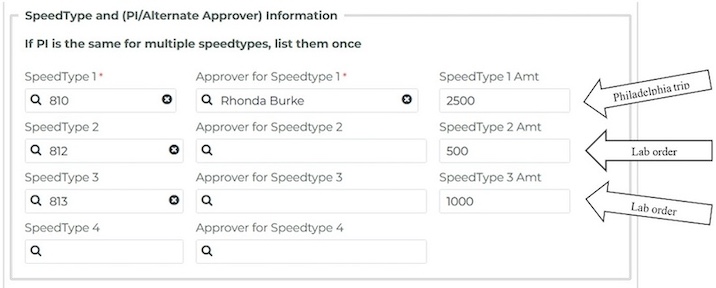
· Enter each type of request on a separate Speedtype line:
EXAMPLE
· Your request may be more meaningful if you include a spreadsheet outlining some of the details:
EXAMPLE

Rejection: How to resubmit your request
Rejected requests/requests that require correction cannot be altered. A new request/case will need to be submitted for approval. DO NOT RECREATE YOUR REQUEST. You can CLONE and resubmit the request by clicking the Resubmit your request button in the rejection email.

QUESTIONS? Contact
· Your Department Director
· Reimbursements & Payables: rsph-rap@emory.edu
· IT: sphsfprod@emory.edu
NEED ADDITIONAL RESOURCES?
Please visit the Finance & RAP MyHub internet: www.myhub.sph.emory.edu